

Pre-launch. For general contractors who already work with AI.

One ledger for every AI in your business. Organized, precise, and smarter with every job.

Every AI on your jobs, in one place. Every number arrives cited and checked, so you approve at a glance.

No new AI to learn. Bring the ones you already pay for.
We just make them better.

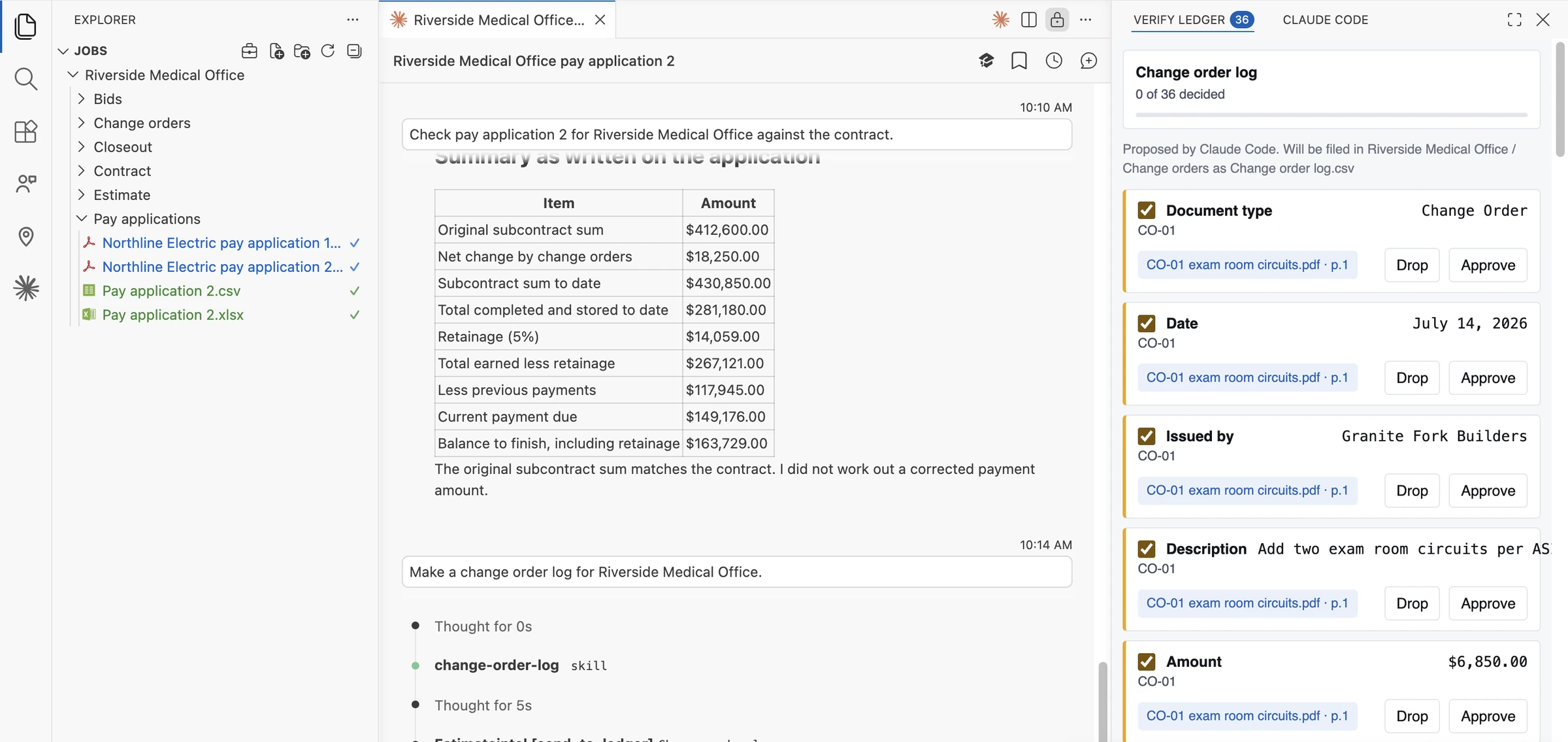
The EstimateIntel app on a sample job. Job folders on the left. In the middle, Claude Code has checked a pay application and is building a change order log. On the right, the verify ledger lists each line with the document and page it came from, with Approve and Drop buttons.
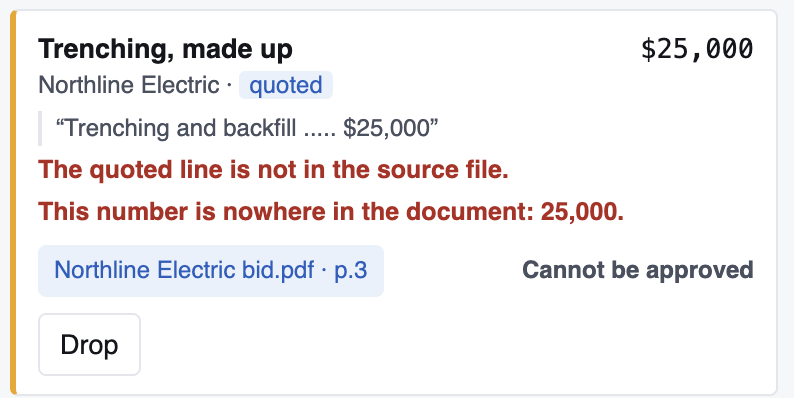
One line from the verify ledger, marked in red: the quoted line is not in the source file, this number is nowhere in the document, cannot be approved. A blue link names the document and page it was checked against.
View the source here
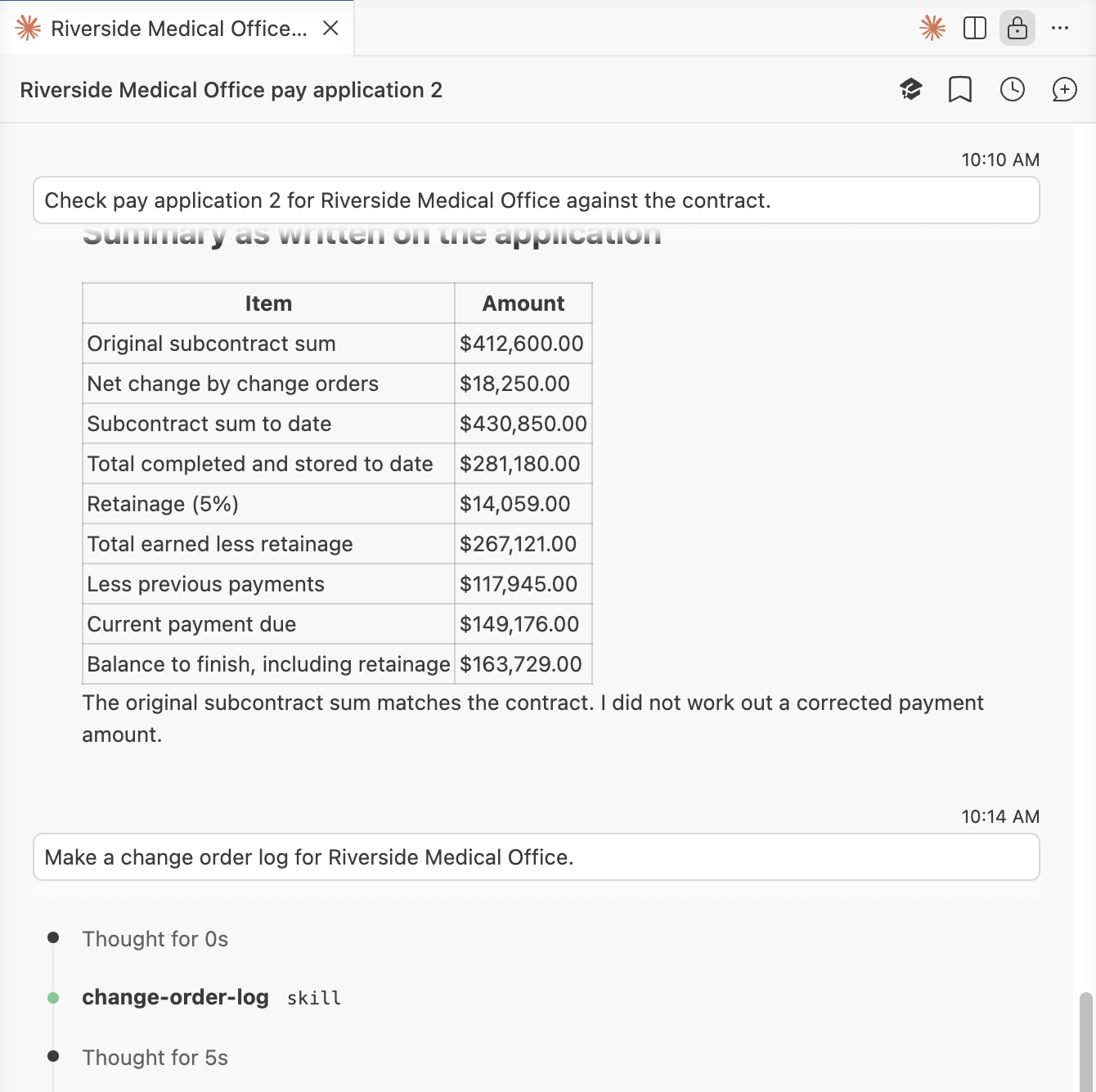
Claude Code working inside the EstimateIntel app. The request reads: check pay application 2 for Riverside Medical Office against the contract. Below it are Claude's summary table and the next request, make a change order log.
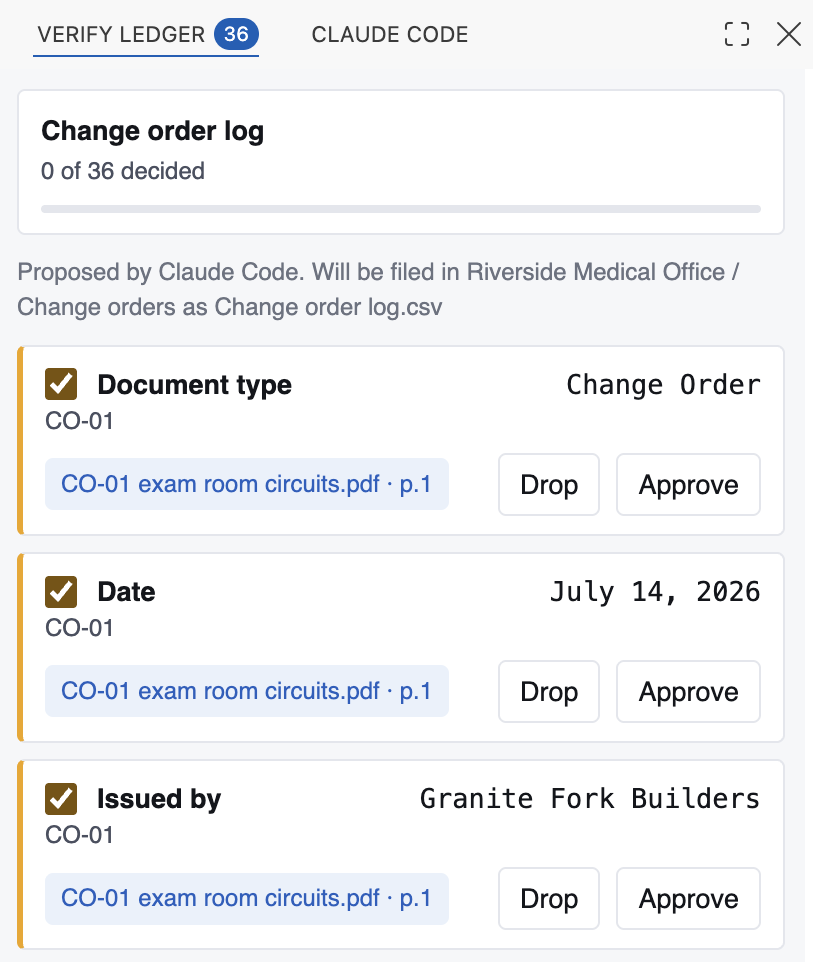
The verify ledger in front. A change order log proposed by Claude Code, each line shown with the document and page it came from, with Approve and Drop buttons.

The real app on a sample job: your job folders, your AI, and the ledger that checks its work. In front, a line from another test that the ledger refused.The real app on a sample job: your request to Claude Code, and the verify ledger checking what it sends.

You know the general contractor who is always a step ahead with AI. They got there by spending nights hunting for the next tool, the next skill, the next better way.

EstimateIntel is that work, done for you. The best AI tools, already working together. The skills, already loaded and getting sharper with every correction. You approve each number with one click.

Why AI works better with EstimateIntel than on its own
AI on its ownAI with EstimateIntel
Gives you a number. You check it by hand.Gives you the number, its page and the exact words, already checked.
Checks its own work.Code checks it, not the AI that wrote it.
Does its own math.The app does the adding and comparing.
A fix in one chat stays in that chat.What you approve and correct carries into every AI you use.

What you get

Every AI. One standard of accuracy. Your yes on every number.

How do you keep every AI working as one team across your business? On their own, they don't talk. One works in your project software, one in your spreadsheets, one from your phone, and none of them knows what the others just did. EstimateIntel is the meeting that keeps them up to speed: one live record of the business, marked with which agent did what, that every agent works from. Claude Code, Codex, Grok, Grok Bot and Muse all work from it, so you can hand off work from your phone when you are not home. Whichever one did the work, it goes through the same check.

Proof

Nothing gets saved unless it's in the document and you said yes.

An AI can't grade its own homework. Here, it doesn't have to. The check is done by code, so a made-up number gets caught no matter how sure the AI sounded.

Watch it catch one.

In this test, a line claims $25,000 for trenching. The bid says $22,000. EstimateIntel read the bid, found no such number, and locked the line. Nobody can approve it, not an agent and not you, so it never reaches your job files or your other software.

It catches the quiet mistakes too. The base bid line said its $431,250 came from page 1. It was really on page 2. EstimateIntel flags that before you approve anything.

A real screen from the app, on sample bids.
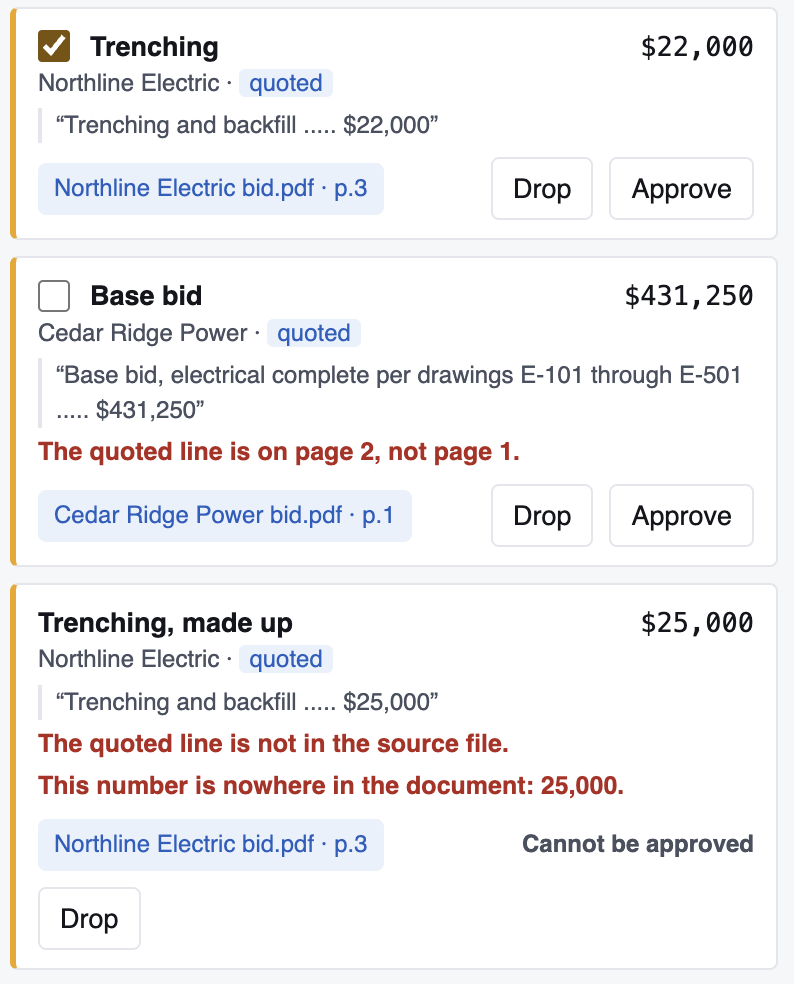
Three lines waiting in the verify ledger. The first shows the quoted words and the page they came from. The second is flagged: the quoted line is on page 2, not page 1. The third claims $25,000 for trenching and is marked in red: the quoted line is not in the source file, this number is nowhere in the document, cannot be approved.

Soon every AI company will ship an agent that can do the work, and those agents will touch your budgets and your schedule without anyone watching each step. Doing the work stops being rare. What stays rare is one checked record of what is true in your business, that every agent works from and only a person can confirm.

The skill pack

What your AI does. What EstimateIntel verifies.

No long setup. No prompts to memorize. Claude Code installs itself, you sign in with the plan you already pay for, and a skill pack is already prepared for you.

What your AI does

Compare sub bids

Your bids side by side, every number tied to its page.

Level a bid tab

See what each bidder included and what each one left out.

Check a pay application

Checked against the contract and the change orders before you pay.

Keep a change order log

Built from the documents, with the source for every entry.

Read a contract

The terms that drive the job, each tied to its page.

Read an estimate

Brought in line by line, and flagged when the lines do not add up to the total.

Find scope gaps

What each bid left out, what no bid covered, and what two subs both priced.

Cross-check the bids

A low bid far under your estimate, a missing bond, a short warranty, a division with no bids.

Check a bid's math

Know when a sub's line items do not add up to the total they wrote.

Job cost against estimate

What a finished job cost, lined up against what you estimated.

Drawings by division

The scope shown on a drawing set, sorted by division, each tied to its sheet.

Schedules, RFIs and warranty

What moved, what is open or late, and whether a callback is still under warranty.

Already have skills of your own? They work here too, and go through the same check.

What EstimateIntel verifies

1

Every number, against its source.

Each one arrives with its file, its page and the exact words, already checked. No combing through documents by hand.

2

Your yes, right where it matters.

Your AI cannot save a number on its own. It has to stop and show you first.

3

Then your AI works better next time.

Everything you approve and every correction you make goes into your memory. Your AI starts the next job already knowing it.

Rolling out with early access

We're on your side of the table.

A platform for building out the best agentic tools and workflows for general contractors, done for you.

No two general contractors work the same way. When your AI spots something that would help it do your work better, it writes up a suggestion, and you decide whether it gets sent to us. Say yes, and we build it in. It arrives in your next update. We maintain the structure your facts live in, so EstimateIntel gets more accurate and precise for you with every job.

Your AI runs on your own subscription. We do not sell or resell AI usage, and we never see your sign-in.

Where it stands

What works today, and where it is going.

Works today

  • A Mac appBuilt and tested on sample jobs.
  • Claude Code, Codex, Grok, Grok Bot and Muse, side by sideOn the same job files, on your own subscription.
  • One check for all of themEvery number checked against its document before it is saved.
  • A skill pack, ready to useBids, pay applications, change orders, contracts, estimates and more.
  • Work that waits for youAn AI can keep working while you are out. What it finds waits in line for your yes.
  • The best tool for each jobEstimateIntel keeps track of which AI did each kind of work, so you know which one to put on it.
  • Skills that learn from your correctionsCorrect it once and it stays corrected.

Coming soon

  • Your whole team on the same jobsEach person works the jobs that are theirs.
  • Plugins for the AI apps you already useThe same check, inside Claude and ChatGPT.
  • Approve from your phone
  • A public Mac download, then WindowsEarly access comes first.

Questions

Plain answers.

What is EstimateIntel?

EstimateIntel is a desktop app for general contractors that sits on top of the AI you already use. Sign in with your own Claude Code, Codex, Grok, Grok Bot or Muse, open your job folders, and work the way you already do. The difference is that every number your AI produces is automatically checked against the document it came from and held for your yes before it is saved. If you have used the Claude desktop app, VS Code or Cursor, it will look familiar: job folders on the left, your AI in the middle, and the verify ledger on the right.

Why is AI better with EstimateIntel than on its own?

On its own, an AI gives you a number and you check it by hand. With EstimateIntel, each number arrives with its file, its page and the exact words, and code checks them against the document, not the AI that wrote them. The app does the adding and comparing. What you approve and correct carries into every AI you use.

Who is it for?

General contractors and estimators who already use AI and want to get more out of it. If you work with Claude, ChatGPT or Grok on your jobs and check every number by hand, it is built for you.

Which AI does it work with?

Claude Code, Codex, Grok, Grok Bot and Muse. Claude Code installs itself the first time you open the app. You can switch between them, and they all work on the same job files and the same record.

Do I pay EstimateIntel for AI usage?

No. AI usage runs on your own subscription. We do not sell or resell AI usage, and we never see your sign-in.

What does EstimateIntel cost?

Plans start at $20 a month. Your AI runs on your own subscription, so EstimateIntel adds no AI usage charge on top.

What does "nothing gets saved unless it's in the document and you said yes" mean?

When your AI wants to save a number, it has to send it to the verify ledger with the file, the page and the exact words it is quoting. Code checks that the words and the number are really in the document. Then you approve. Only then is anything filed. A line the code has shown is not in the document cannot be approved by anyone.

Why does code do the check instead of AI?

An AI writes what sounds right. It can be sure of itself and still be wrong, and it is a soft grader of its own work. Code doesn't guess. It looks for the exact words and the exact number in the document, gets the same answer every time, and can't be talked out of it. The math is done by code too.

What kinds of documents can it check?

PDFs, Excel, Word and text files. It names the page a quote is really on. Scanned documents are flagged for you to check by eye. Reading scans is coming.

Where do my files live?

In your own job folders, whether they live on your computer, in SharePoint or in OneDrive. The files are yours. Your AI cannot write into a job folder directly. What EstimateIntel builds is the memory: every approved fact, with who approved it and where it came from.

Can I download it now?

Not yet. The Mac app is built and has been tested on sample jobs. A public download and a Windows version are coming. Leave your details on this page and we will tell you when early access opens.

Get early access.

Be one of the first general contractors running every AI in one place. Leave your details and we will tell you when early access opens. That is the only thing we use them for.

Plans start at $20 a month.

Which AI do you use now?
Your computer